

You can build some awesome progress indicators utilizing the FileMaker web viewer. Because they do not require a plug-in they display well on FileMaker Go as well. They also do not require access to the internet because the html for the web viewer is embedded directly in FileMaker.
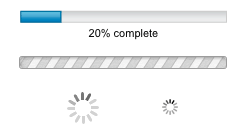
These examples are very simple to display from script control by changing the value of the global variables $$progress or $$progressText. If they are blank, nothing will be displayed.
Download the Awesome Progress Bar sample file here.

Hi Tim, your solution is quite interesting.
I have an issue I was hoping you could shed a light on it. When I open your demo file on Pro 11 the progress bar display properly, however when I open it in Filemaker Pro 10 I get the little white icon with the red “x” indication the file is missing. Is this an issue with the way Pro 10 web viewer interprets the base 64 file?
Thank you
I’ve noticed some issues with display of this code in the web viewer on older versions of FileMaker or Windows where an older Internet Explorer rendering engine is used. Everything seems to work fine with FileMaker 11 and more recent versions of Windows/IE.
hi tim,
thanks for sharing your solution… i think it is awesome!! i have essentially copied your web viewer content and your script steps to enable this same functionality in one of my own solutions. so that all works great.
now i am trying to follow your suggestion about customizing the graphic to mesh with my layouts. i created a .gif from “ajaxload” but i am having difficulties with the next step (does it matter that they generated a .gif and not a .png for me?). i placed the image on my desktop. next, i opened terminal and typed in the text you specified replacing the “FILEPATHIN” and “FILEPATHOUT” with the name of the graphic file (in my case it happens to be “ProgressWheel__Black_White.gif” (i leave the “.gif” out when substituting the text)). so my command line reads: “openssl base64 -in ProgressWheel__Black_White.gif -out ProgressWheel__Black_White.txt”. however, i get an error which says “no such file or directory”. i think i need to specify the path somehow but i don’t know anything about command line instructions. Do you mind taking me a couple steps further? will it be obvious once i have this text where to insert it in the web viewer calculation? thanks again for sharing sucha great feature!
regards,
john h.
If you’re on a Mac, you can begin typing the command line, pause before the FILEPATHIN. Drag the file in question onto the terminal window and it will type the full path name of the file for you. Then you can continue typing the rest of the command. Give that a try…
I love your solution and have implemented it in my database. However, one question. Is there a way to make the webviewer transparent so that you can use this solution on something other than a white background?
One further question. Is it possible to have the first frame of an animated gif show when the progress bar is inactive so that it can be made into a button that activates when clicked?
Yes, I believe the web viewer can be made transparent via the FileMaker toolbar. See this detailed info regarding the web viewer.
http://help.filemaker.com/app/answers/detail/a_id/6087/~/web-viewers-in-browse-and-find-mode,-form-and-list-view
I’m not sure about showing the first frame of an animated gif while inactive…that may require something more complex…or may not be possible. I’d love to see others ideas to build on this…
Thanks for your response Tim. Unfortunately, it does not seem to work. Even setting the criteria to transparent still results in a white rectangle while the progress bars are not active. This limits its use to white backgrounds.